
Toobit’s tiered Pro Trader system is very popular among our users. To further encourage experienced traders to offer higher-quality strategies and enhance the overall copy trading experience, we are providing a detailed explanation of the trader configuration features.
1. Overview of Copy Trading Parameters
| Type | Parameters | Details |
| Trading Support | Leader Trade Pair | All perpetual contract trading pairs |
| Max. Leverage |
- BTC:150x - ETH:125x - Other pairs as per the page |
|
| Trading Fees | Same as perpetual contract trading fees. Please refer to theContract Info page | |
| Share Trades via API | Yes | |
| Copy Trading Settings | Maximum Number of Followers |
- Co-Pilot: 100 - Pilot: 500 - Captain: 1000 - Astronaut: 3000 |
| Minimum Input | The order amount invested by the follower must be greater than or equal to the set amount | |
| Profit Sharing Rate | Public Leading | Up to 20% |
| Private Leading | Up to 50% (Please get in touch with customer support for review or reach out to your account manager) | |
| Settlement Method | Daily (T+1) or weekly settlements. Earnings are credited to accounts at 08:00 (UTC) daily/weekly. | |
| More | Copy Trading Methods | Fixed Amount Mode and Fixed Ratio Mode |
| Stop Loss/Take Profit Supported | Yes | |
| Private Leading | After activation, users can only follow orders with your invitation |
2. What is Zero Slippage Copy Trading?
Toobit's Zero Slippage Copy Trading is a feature that enables price synchronization between followers and pro traders. This effectively avoids slippage caused by market volatility. It also provides a more precise and stable copy trading experience for our users.
Your followers can enable or disable this feature on the Copy Settings page.
- For new followers: Go to the Copy Trading page, select a pro trader, and turn on "0 Slippage Copy" during the setup process.
- For existing followers: Go to My Copy Trades, select "Edit Copy Settings" to switch the feature on or off.
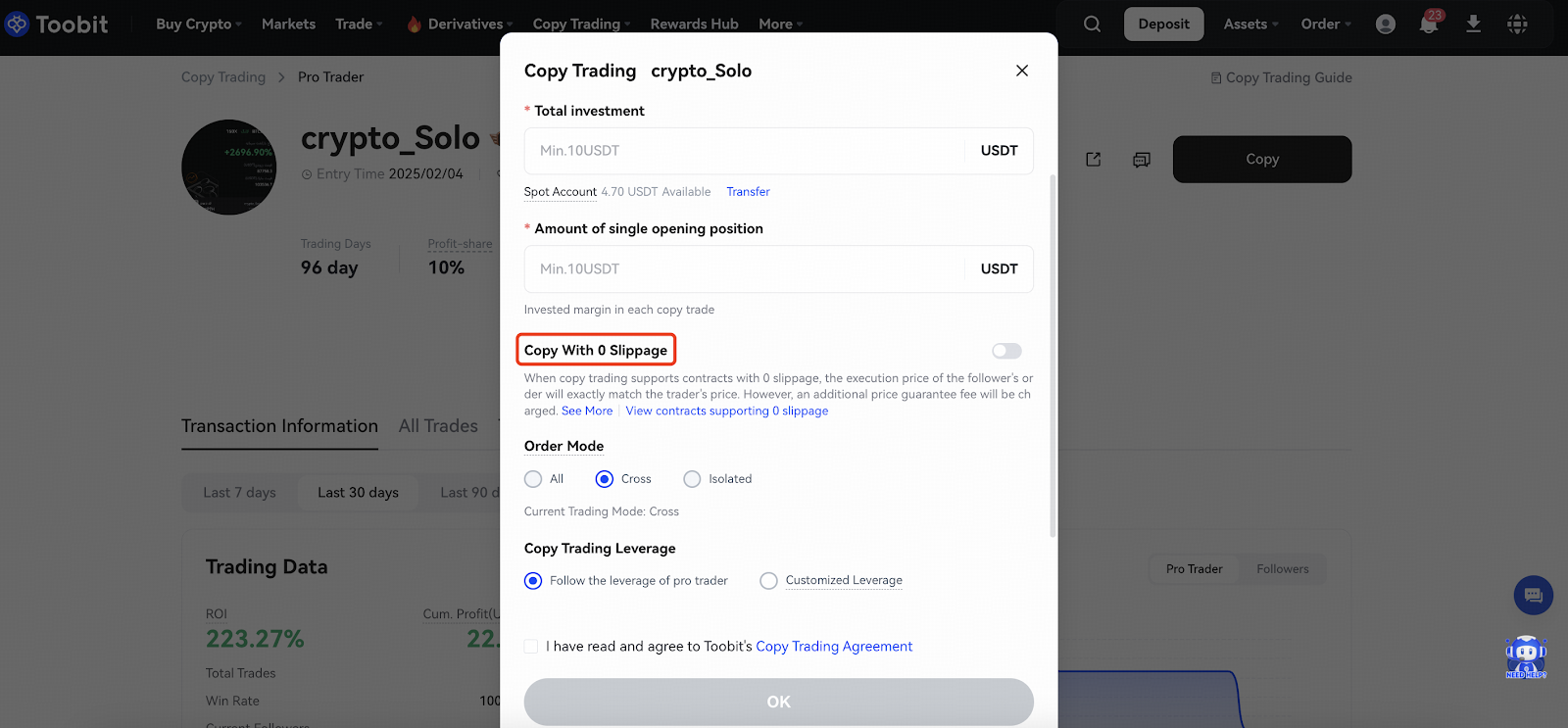
To achieve zero slippage, Toobit collaborates with over-the-counter (OTC) market makers, who take over copy orders and execute them at the same price as the trader. Since OTC execution involves costs, the platform subsidizes part of the market maker fees, while users who enable Zero Slippage will bear a portion. All fees collected are ultimately paid to the market makers.
3. How to Set Up Copy Trading API
To use the trader copy trading feature, users can go to the API Management section in the Personal Center and click on Lead Trader API.
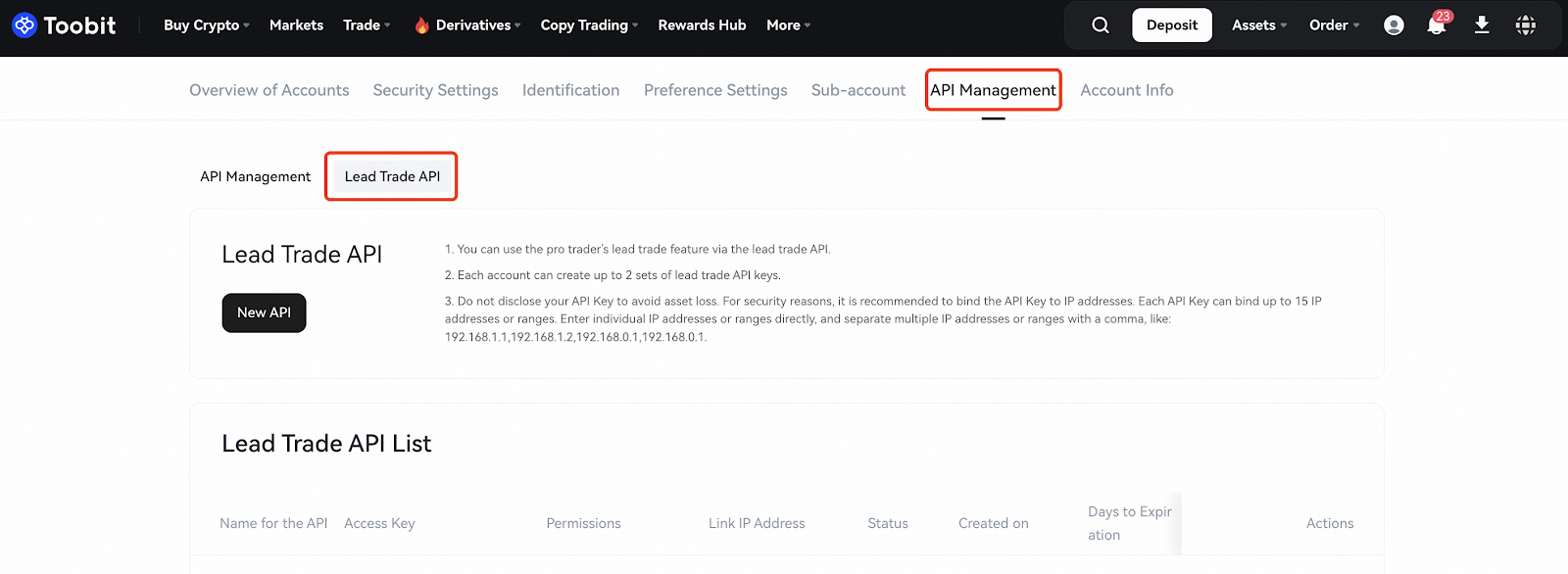
- Users can use the pro trader's lead trade feature via the lead trade API.
- Each account can create up to 2 sets of lead trade API keys.
How to Activate API
- Users who have not completed advanced verification may only apply for 'read-only permission'
- Users who have completed advanced verification can apply for both 'read-only' and 'read-write' permissions
- To activate, please provide your UID and API creation purpose, and contact 24/7 online support for assistance. Alternatively, you can contact your account manager directly for faster processing.
- API permission request will be completed within 3 business days
4. How to Manage Followers for Pro Trader
On the Pro Trader page, click "My Followers" to view current copy traders, total copied investment, cumulative principal, cumulative profit, and runtime. Under "Actions", users can remove followers who are not currently copying your trades. Once removed, they will no longer be able to copy your trades unless they choose to follow you again.
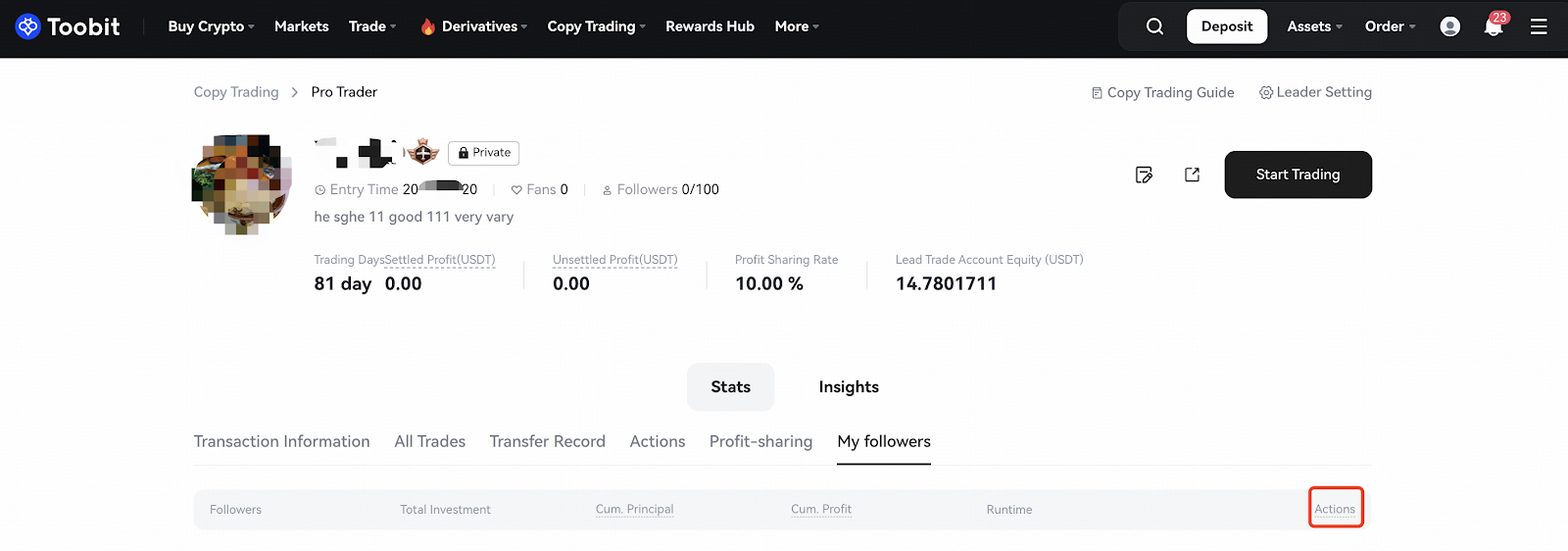
Please note that you may only remove a follower if they have no open positions.
5. How to View Profit Sharing
Go to the ProTrader page and click "Leader Setting" in the top right corner. Then select "Profit-Sharing Rules" to view or adjust your settings.
Profit-sharing Period
-
- Weekly: After setting, the profit sharing will be settled uniformly at 8:00 (UTC) every Monday
- Day: After setting, the profit sharing will be settled at 8:00 (UTC) on T+1 day
Profit Sharing Rate
- Profits shared = profit of users followed * set profit sharing rate
Minimum Input
- The order amount invested by the follower must be greater than or equal to the set amount
6. How to Enable Private Copy Trading
Go to the Pro Trader page and click "Leader Setting" in the top right corner. Then select "Private Leading" to view or adjust your settings.
After activation, the following changes will occur:
- Users can only follow orders through the invitation code you provide, otherwise they cannot follow orders
- Users who have already followed are not affected and can continue to follow
You can customize the scope of users allowed to follow you:
- All: All users can follow orders through your invitation code
- Only directly invited friends: Only friends who are bound with your registration invitation code can follow orders with your invitation code
- Only directly/indirectly invited friends : Only friends who are bound with your registration invitation code and their subordinate friends can follow orders with your invitation code
7. How To View or Change Basic Copy Trading Settings
Go to the Pro Trader page and click "Leader Setting" in the top right corner. Then select "Leader Trade" to view or adjust your settings.
- Leader Trade Pair: After setting, the follower will follow the trade when trading the selected contractual trade pair, and will not follow when trading other trade pairs.
- Leader Cooling Time: After setting, the follower will follow any trade that occurs at any time.
- Position Mode: After setting, the follower will follow the trade when trading contracts of any mode.
- Strategy Protection: After activation, key information such as token pair will be hidden to prevent any leakage of your trading strategy when unfollowed users view your current orders.
8. How to View Copy Trading History
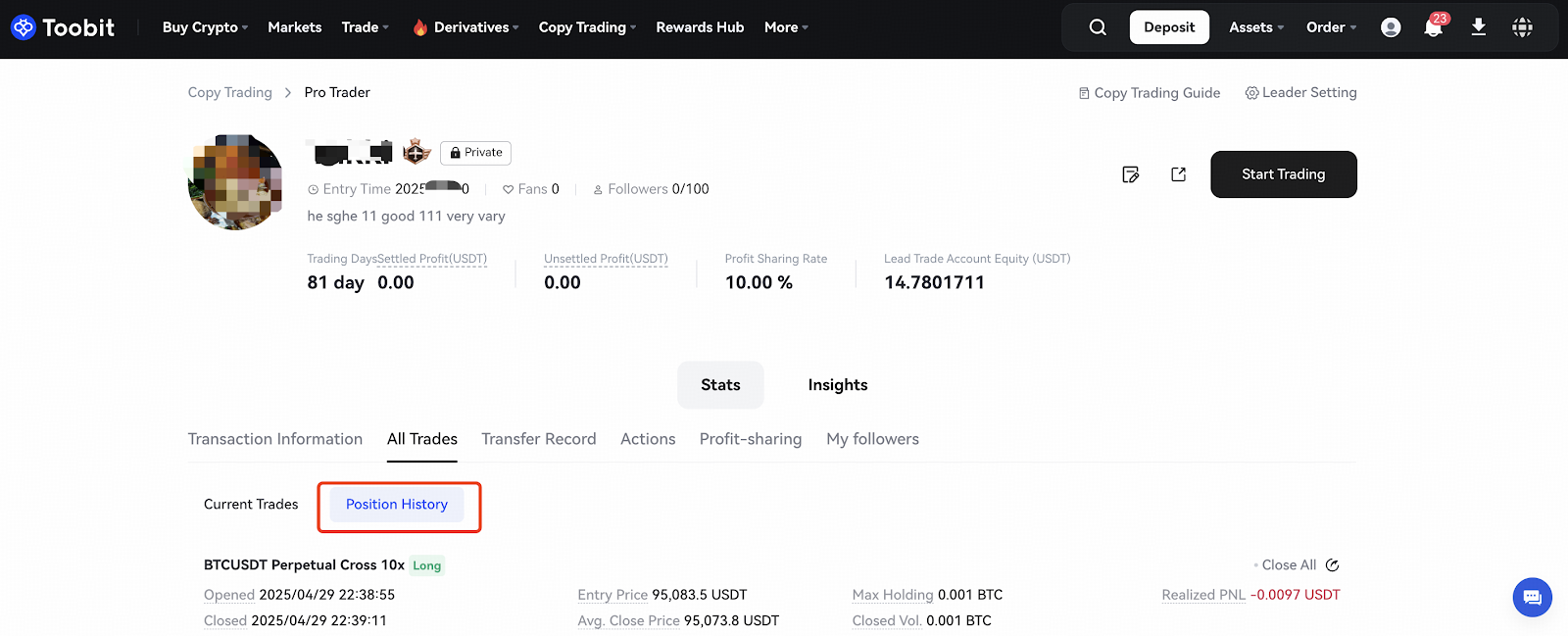
On the Pro Trader Homepage, click Position History under All Trades to view your copy trading position history.
We hope that this FAQ will help you understand the functions of Copy Trading here on Toobit! We at Toobit are always looking for ways to improve and provide better services for our users. Thank you for always trusting and using Toobit!
If you have any questions, please start an online chat or submit a ticket through the Customer Service Center on our official website or APP.
Disclaimer: This content is for informational purposes only and does not constitute investment, legal, taxation, or financial advice, nor does it recommend purchasing or selling any assets. Users are advised to fully understand the risks before making any investment decisions. All actions taken are at the user's discretion and are not associated with this platform.
Toobit Team
2025-05-08
X: https://x.com/Toobit_official
Telegram: https://t.me/Toobit_EN
Discord: https://discord.com/invite/vvxTuGTz
YouTube: https://www.youtube.com/@Toobit_official
Reddit: https://www.reddit.com/r/toobit/
Facebook: https://www.facebook.com/toobitofficial
Medium: https://medium.com/toobit-exchange


