


Toobit now supports TradingView alerts, allowing you to receive real-time market signals directly in your Toobit account. By setting price or strategy alerts on TradingView, signals are instantly delivered to Toobit—helping you react faster and stay ahead of market moves.
With TradingView alerts integration, you can create alerts directly on TradingView's advanced charts and receive synchronized notifications on Toobit, improving both reaction speed and decision-making efficiency.
1. What are TradingView alerts?
TradingView alerts are notifications triggered when predefined market conditions are met—such as price breakouts, indicator signals, or strategy events.
By connecting TradingView alerts to Toobit, you can:
-
Create alerts directly on TradingView
-
Automatically push alert signals to Toobit
-
Receive notifications on the Toobit web and app
-
Stay informed of market moves and trading signals in real time
2. Who can use this feature?
-
A TradingView Pro or higher subscription is required to create Webhook alerts.
-
All Toobit users can use this integration and receive alerts at no additional cost.
3. What do you need before getting started?
-
A registered and logged-in Toobit account
-
A TradingView Pro (Essential) or higher subscription
-
Any open Spot or Futures trading page on Toobit (e.g., BTCUSDT, ETHUSDT Perpetual)
4. How to get TradingView integration details on Toobit
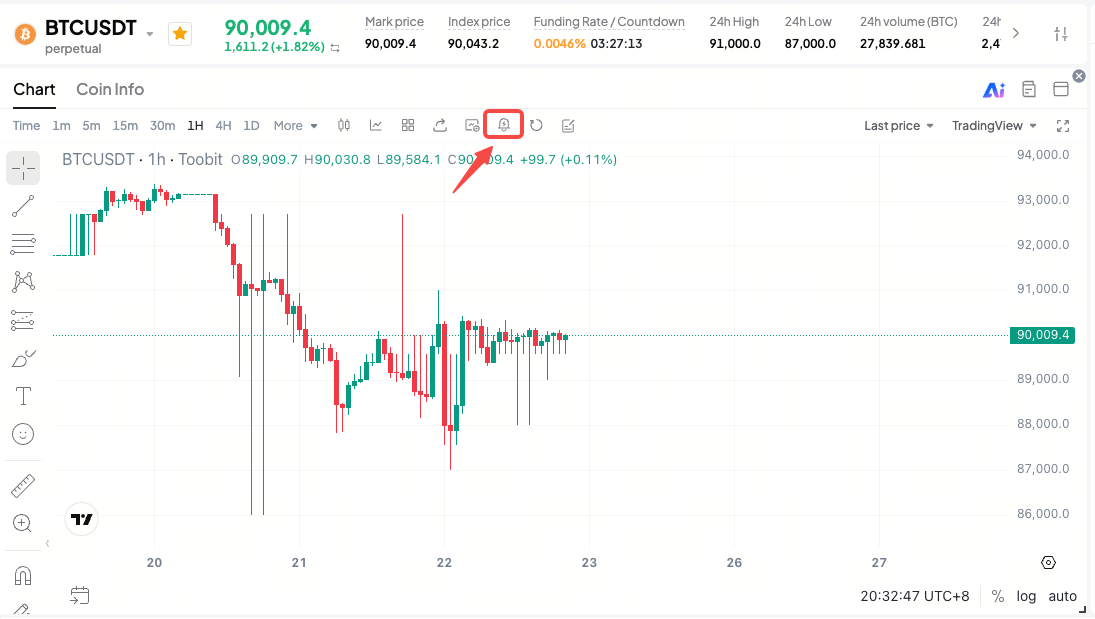
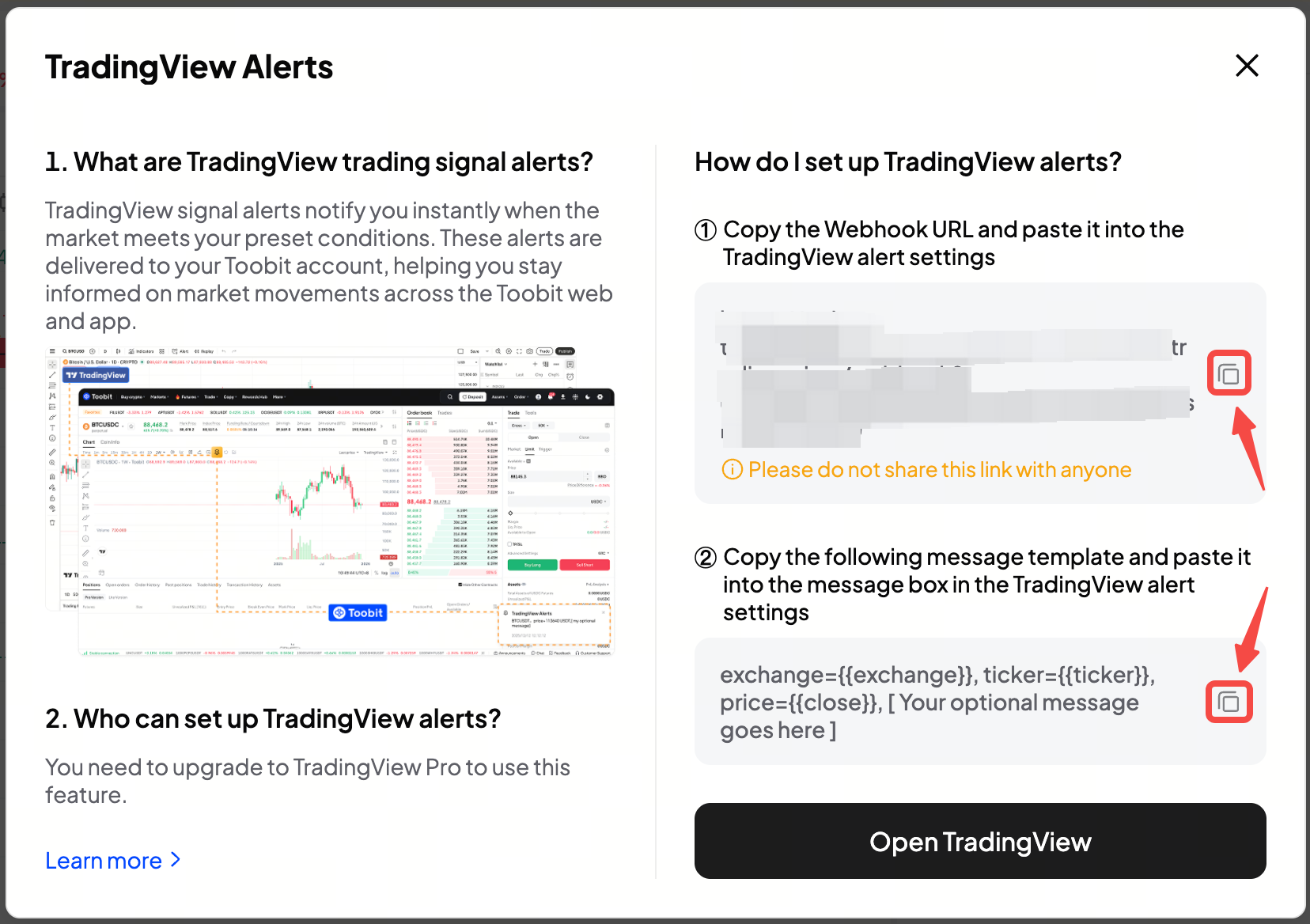
Go to any Spot or Futures trading page on Toobit and click "TradingView alerts" from the chart toolbar. The system will generate the required integration details for you.
Important notes
-
Webhook URL
This URL is used to receive alert signals from TradingView. Please keep it secure and do not share it with others, as misuse may lead to alert abuse or security risks.
-
Message template
Toobit provides a standard message format:
exchange={{exchange}}, ticker={{ticker}}, price={{close}}, [Your optional message goes here]
You may also add custom notes, for example:
exchange={{exchange}}, ticker={{ticker}}, price={{close}}, strategy: breakout
5. How to set up alerts on TradingView
Step 1: Select a trading pair
Open TradingView Supercharts and search for the relevant spot or perpetual pair, such as BTCUSDT or ETHUSDT.
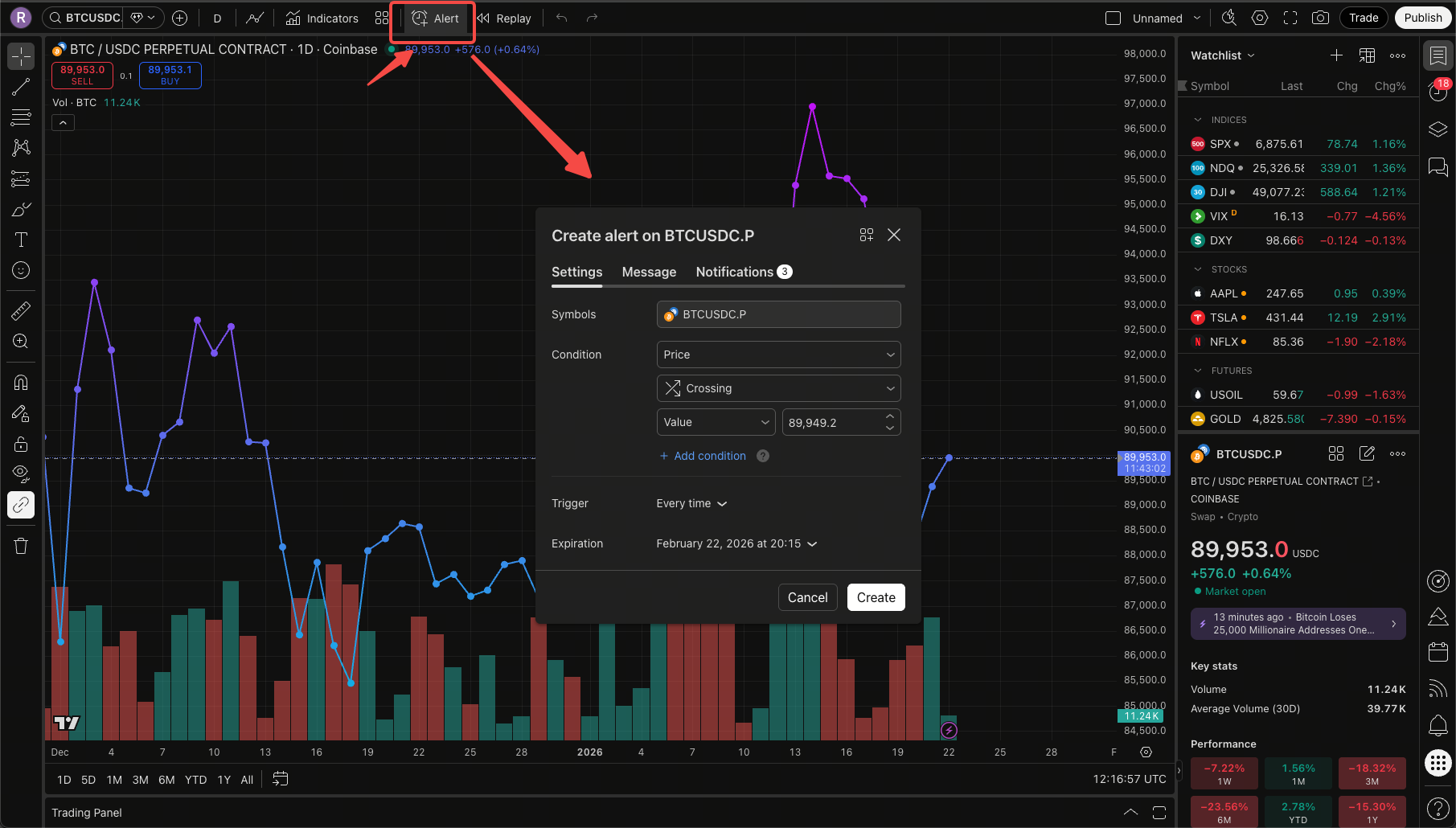
Step 2: Create an alert
Right-click the chart and select [Create alert], or click the [alert] in the top toolbar.
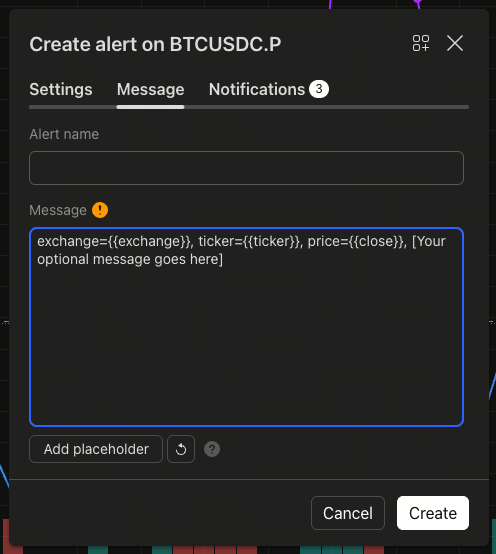
Step 3: Fill in the message
Paste the Toobit message template into the Message field, for example:
exchange={{exchange}}, ticker={{ticker}}, price={{close}}, [Your optional message goes here]
Step 4: Add the Webhook URL
Enable Webhook URL and paste the Webhook link provided by Toobit.
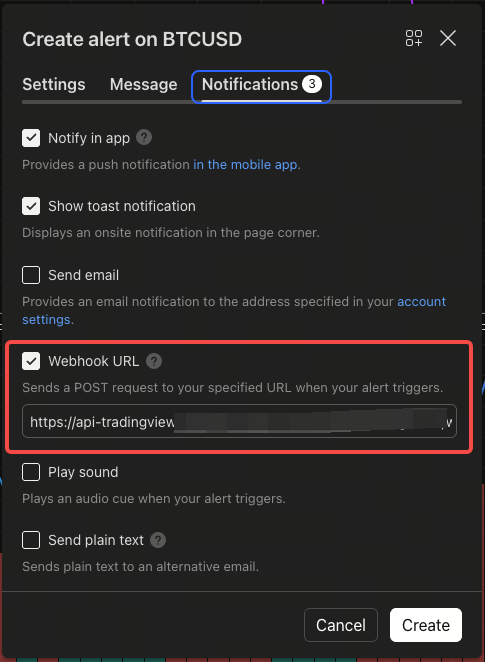
Step 5: Save
Click [Create] to complete the setup.
6. What happens when an alert is triggered?
When market conditions meet your alert criteria:
-
TradingView triggers the alert
-
Toobit receives the signal simultaneously
-
You'll receive real-time pop-ups and push notifications on Toobit
-
Example alert message:
"exchange=BINANCE, ticker=BTCUSD, price=89824,[Your optional message goes here]"
7. TradingView alerts FAQ
Q1: Why did Toobit not receive my TradingView alert?
Please check the following:
-
Did you use the Webhook URL provided by Toobit?
-
Is the message template filled in correctly?
-
Are you using a TradingView Essential (Pro) plan or higher?
-
Has the alert actually been triggered?
-
Has the Webhook URL been modified or shared with others?
Q2: Can I set up multiple TradingView alerts?
Yes. You can create multiple alerts for different trading pairs and strategies, all delivered to Toobit.
The number of alerts depends on your TradingView subscription level. Higher-tier plans typically support more alerts.
Q3: Are strategy-based alerts supported (e.g., indicators or strategy signals)?
Yes. As long as TradingView supports alerts with Webhooks, Toobit can receive them.
Q4: Does this support automated trading?
No. TradingView alerts on Toobit are for market and signal notifications only. Automated order execution is not supported at this time.
8. Notes
-
Add clear notes in the message field to distinguish different strategies
-
Avoid setting alerts too frequently to reduce noise
-
Never share your Webhook URL
-
Review and update your alerts regularly
-
Always confirm market conditions before placing trades after receiving an alert
-
Custom message fields do not support URLs or special characters such as {{
Disclaimer
This article is for reference only and does not constitute investment advice, recommendations, or any form of financial, legal, or tax guidance. Digital asset trading involves significant risk and price volatility. Please make decisions based on your own financial situation and consult professional advisors if necessary. Users are responsible for understanding and complying with applicable local laws and regulations. If you have any questions, feel free to contact our Customer Support.


