
1. What is Toobit Futures Demo Trading?
Toobit Futures Demo Trading provides a virtual trading environment based on real market data, allowing you to experience futures trading without risking real funds. With demo trading, you can explore platform features, practice trading operations, and test different trading strategies.
When you first enter your demo account, you will receive 20,000 USDT in virtual USDT for trading practice. All profits and losses generated in Demo Trading are simulated and will not affect your real account assets.
2. What is virtual USDT?
Virtual USDT is Demo Trading funds provided by Toobit exclusively for Futures Demo Trading.
Virtual USDT:
-
Has no real value;
-
Cannot be withdrawn, transferred, or exchanged;
-
Cannot be used for real trading.
Demo Trading supports the following features:
-
Opening and closing positions;
-
Market orders, limit orders, trigger orders, trailing stop orders, TP/SL orders;
-
Leverage settings.
3. How to use Futures Demo Trading?
The following steps explain how to access Demo Trading on the Toobit app and website.
Toobit app
Step 1: Log in to the Toobit app
Download and install the Toobit app, then log in to your account.
Step 2: Enter Demo Trading mode
You can access Demo Trading through the following methods:
Method 1: On the homepage, tap [Futures], then tap the [...] icon in the top-right corner and select [Demo Trading].
Method 2: Go to [More] on the homepage → [Trade] → [Demo Trading].
After entering Demo Trading, the system will automatically provide virtual USDT, and you can view your demo account balance.
Step 3: Select a trading pair and start trading
In the Demo Trading interface, select a trading pair (for example, BTCUSDT), set the leverage, choose your position direction (Long/Short), enter the order quantity, and confirm your order to start.
Toobit website
Step 1: Log in to the Toobit website
Visit the Toobit website and log in to your account.
Step 2: Switch to Demo Trading
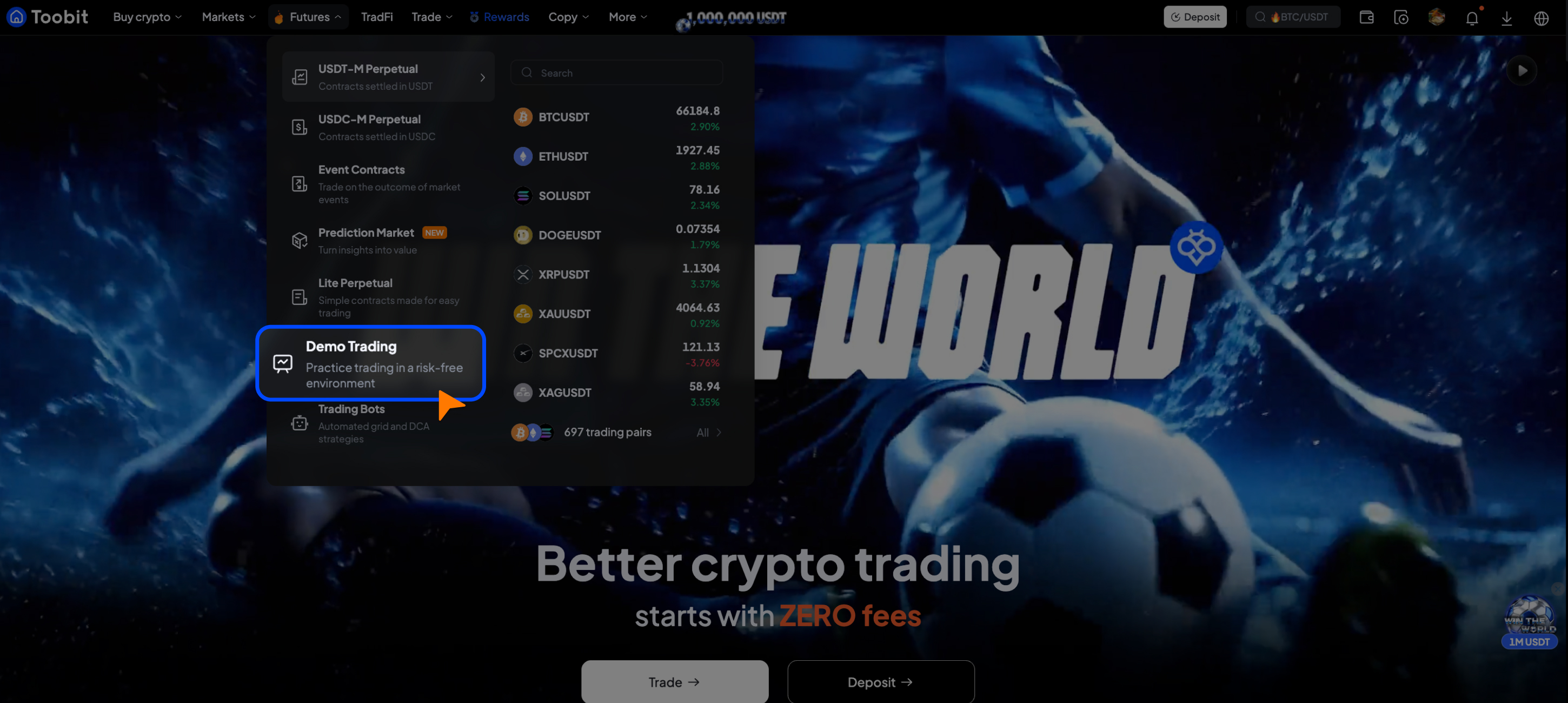
Hover over [Futures] in the top navigation bar and select [Demo Trading].
You will be redirected to the Demo Trading environment, where your virtual USDT balance will be displayed.
Step 3: Start trading
Select a trading pair, set leverage, choose an order type (market order or limit order), enter the order quantity, and click [Buy Long] or [Sell Short] to place a demo order.
4. Supported trading pairs
Toobit futures Demo Trading supports popular USDT-margined perpetual futures contracts, including:
-
BTCUSDT
-
ETHUSDT
-
SOLUSDT
-
XRPUSDT
More supported trading pairs may be added or updated. Please refer to the Demo Trading page for the latest available pairs.
5. Virtual USDT claim rules
When you first enter Toobit Futures Demo Trading, you will automatically receive 20,000 USDT in virtual USDT for trading practice.
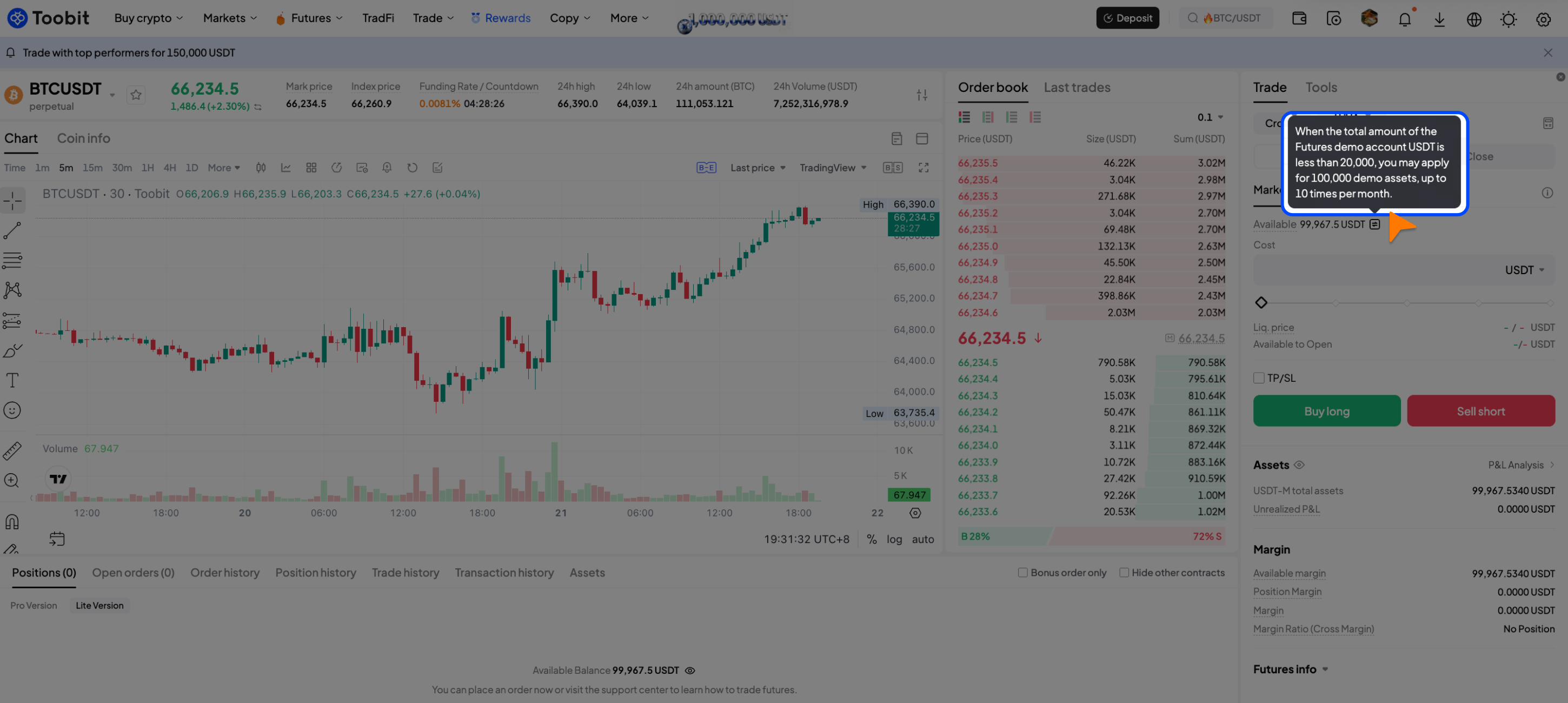
When your total demo account balance falls below 20,000 USDT, you can claim an additional 100,000 USDT in virtual USDT. Each user can claim Virtual USDT up to 10 times per month.
Virtual USDT is only available for Demo Trading and has no real value. It cannot be withdrawn, transferred, or used for live trading.
6. Demo Trading vs. Live Trading
Toobit Futures Demo Trading provides a trading experience similar to live futures trading. It supports the same core trading processes and features, including the trading interface, order types, opening and closing positions, leverage settings, and position management.
After practicing Demo Trading, you can switch to your Futures Account and start trading with real assets.
Important notes:
-
Demo Trading is available to all users by default and does not require manual activation;
-
Demo Trading uses real-time market data, but prices or data may experience slight delays due to network latency or other factors;
-
Demo Trading helps you practice futures trading, test strategies, understand order types, and gain hands-on trading experience;
-
Demo Trading results do not represent actual trading performance. Futures trading involves risks, so please trade according to your risk tolerance.
7. FAQ
1. What is Toobit Demo Trading?
Demo Trading is a virtual trading environment that allows users to experience futures trading without using real funds. Users can simulate trades, test strategies, and become familiar with platform features.
2. Do I need to deposit funds to use Demo Trading?
No. Once you enter Demo Trading, the system will automatically provide virtual USDT for trading practice.
3. Are profits and losses from Demo Trading real?
No. All profits and losses generated from Demo Trading are simulated and will not affect your real account balance or assets.
4. Can I withdraw Demo Trading profits?
No. Virtual USDT and simulated profits are only for trading practice and cannot be withdrawn, transferred, or used for live trading.
5. Who can use Toobit Demo Trading?
Demo Trading is available to all Toobit users by default and does not require manual activation. It is suitable for beginners who want to learn futures trading and experienced traders who want to test trading strategies.
Risk Disclaimer
Futures trading involves significant risks and may result in the loss of funds.
Demo Trading is provided for learning and strategy testing purposes only and does not represent futures trading performance. Please ensure you fully understand the risks involved and trade responsibly according to your own risk tolerance.


