
1. What is a trailing stop order?
The trailing stop order is a conditional order that automatically adjusts its trigger price based on market movements.
Once the market price reaches the activation price you set, the order begins tracking the market. It continuously records the highest price (for buy orders) or the lowest price (for sell orders). If the market subsequently retraces by the callback rate you have set, the system automatically submits a market order for execution.
The trailing stop order is triggered when the latest mark price retraces by the specified callback rate from the highest price (for buy orders) or the lowest price (for sell orders) recorded after activation. It is particularly effective for protecting unrealized profits in trending markets, automatically closing positions during trend reversals, and confirming pullbacks in volatile market conditions.
Compared with traditional TP/SL orders, a trailing stop continuously adjusts its trigger level as the market moves in your favor. This enables you to lock in more potential profits while reducing the need for manual adjustments, and automatically submits a market order when the specified retracement is reached.
2. Parameters
|
Parameters |
Description |
Example |
|
Callback rate |
Defines the percentage retracement from the highest price (for buy orders) or the lowest price (for sell orders) recorded after activation. When the latest mark price retraces by the specified percentage, the system submits a market order. |
If the highest price recorded after activation is 50,000 USDT and the callback rate is 5%, the trailing trigger price will be 47,500 USDT (50,000 × (1 − 5%)). |
|
Order quantity |
The quantity to be executed when the trailing stop order is triggered. |
N/A |
|
Activation price |
The price at which the trailing stop begins tracking market movements. Once the latest mark price reaches the activation price, the order enters tracking status, and the system begins calculating the trailing trigger price dynamically. |
If the current mark price is 100,000 USDT and the activation price is set to 102,000 USDT, the order enters tracking status once the mark price reaches 102,000 USDT. |
3. How to place a trailing stop order
Step 1: Set up your trailing stop order
-
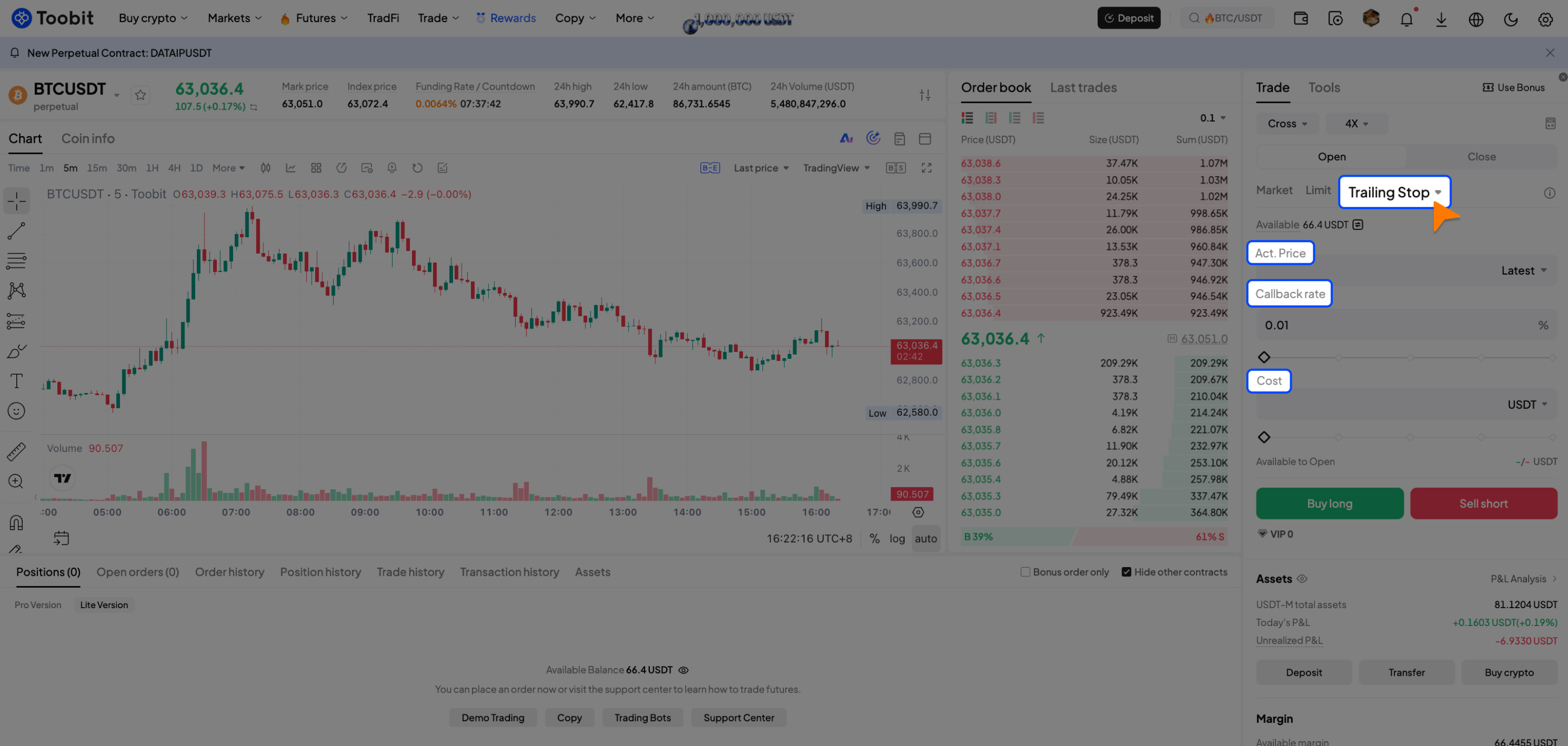
On the Futures trading page, select Trailing Stop as the order type.
-
Enter the required order parameters, including: Activation price, callback rate, order quantity
-
Review the order details, then click [Buy long] or [Sell short] to place the order.
Step 2: View your trailing stop orders
-
In the Positions area, click [Open orders].
-
Select the [Trailing Stop] tab.
-
You can view the following order details:
-
Order type
-
Activation price
-
Order quantity
-
Callback rate
-
Trailing trigger price
-
Order status
Step 3: Understand order status
A trailing stop order can have one of the following statuses:
-
Pending activation: The order has been placed and is waiting for the market price to reach the specified activation price.
-
Tracking: Once the activation price is reached, the order begins tracking market movements. The system continuously updates the highest or lowest price reached and dynamically calculates the trailing trigger price.
-
Triggered: When the market price retraces by the specified callback rate, the system automatically submits a market order for execution. After the order is triggered, you can view the execution result in the [Positions] section.
4. Notes
4.1 Activation price is a required parameter for all trailing stop orders. The order will begin tracking the market only after the market price reaches the specified activation price.
4.2 Please set the activation price and callback rate appropriately based on current market conditions. Improper settings may prevent the order from being triggered or cause it to trigger earlier than expected.
4.3 Before a trailing stop order is activated, it does not reserve margin or position. Please ensure that a sufficient margin and available position remain available at the time of execution, as other orders may reserve the required resources and prevent the order from being executed successfully.
4.4 Once the trigger conditions are met, the system submits a market order for execution. Due to market volatility and changes in liquidity, the final execution price may differ from the trailing trigger price.
4.5 Market orders follow the IOC (Immediate-or-Cancel) execution mechanism. As a result, orders may be partially filled or remain unfilled if sufficient liquidity is unavailable.
4.6 Trailing stop orders currently do not support price protection or TP/SL settings.
5. FAQs
Q1: What's the difference between the activation price and the trailing trigger price?
These two parameters serve different purposes.
-
Activation price: The activation price determines when a trailing stop order begins tracking the market. Once the market price reaches the specified activation price, the order status changes from [Pending activation] to [Tracking], and the system starts monitoring price movements.
-
Trailing trigger price: The trailing trigger price is calculated dynamically based on the highest price (for buy orders) or lowest price (for sell orders) reached after activation, together with the callback rate you specify. When the market retraces to the calculated trailing trigger price, the system automatically submits a market order for execution.
Q2: Which order parameters can be modified?
The parameters that can be modified depend on the current order status.
|
Order status |
Modifiable parameters |
|
Pending activation |
Activation price, callback rate, order quantity |
|
Tracking |
Callback rate only (adjusting the callback rate also updates the trailing trigger price accordingly) |
|
Triggered |
No parameters can be modified |
Q3: Why was my trailing stop order triggered but not executed?
When a trailing stop order is triggered, the system submits a market order instead of executing the trade immediately.
Under the following circumstances, the market order may be partially filled or fail to execute:
-
Insufficient available margin;
-
Insufficient available position;
-
Insufficient market liquidity;
-
The futures is temporarily unavailable for trading;
-
The market order is executed according to the IOC mechanism, which may result in partial fills or cancellation of any unfilled quantity.
Q4: Why hasn't my trailing stop order started tracking the market?
A trailing stop order enters the [Tracking] status only after the market price reaches the specified [Activation price].
If the market price has not reached the [Activation price], the order will remain in the [Pending activation] status.
Q5: Is a smaller callback rate always better?
Not necessarily.
A smaller callback rate allows the order to trigger sooner but is more sensitive to short-term market fluctuations. A larger callback rate provides more room for price movement but may allow more unrealized profits to be given back before the order is triggered.
Choose an appropriate callback rate based on the volatility of the trading pair, market conditions, and your trading strategy.
Risk Disclaimer
A trailing stop order is a conditional order that is triggered when predefined market conditions are met. Under volatile market conditions, insufficient liquidity, sharp price movements, or other exceptional market circumstances, the execution price may differ from the trigger price. Partial fills, delayed execution, or execution failure may also occur. Once the trigger conditions are met, the system submits a market order for execution. However, execution at or near the trigger price is not guaranteed. Please ensure you fully understand how trailing stop orders work before using this feature.
Please set your activation price, callback rate, and other order parameters according to your risk tolerance, market conditions, and trading strategy, and adjust them as needed. Users are solely responsible for any losses resulting from market risks, price fluctuations, or inappropriate parameter settings.


