
Toobit allows you to easily view and download your account statements, giving you a clear overview of your asset balances and activity. Each statement includes your name, email, UID, and a detailed snapshot of your account assets for the selected period.
1. Access the [Account statement] page
Web: Log in to your Toobit account, go to [Profile] > [Account Statement] to view your monthly statements. App: Log in to the Toobit app, and go to [Profile] > [Preferences] > [Account Statement] to view your monthly statements.
2. Select the month
Choose the statement for the month you wish to view or download.
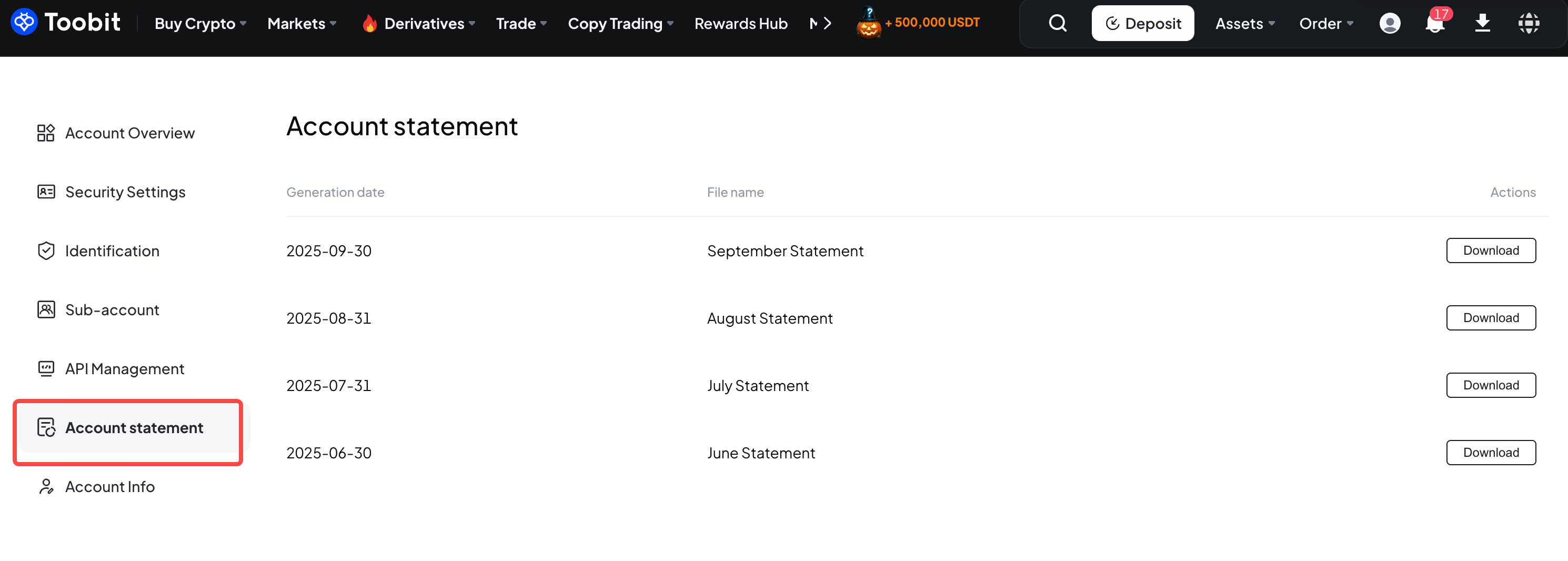
3. Download your statement
Click [Download] to save the statement directly to your device.
Notes:
-
Available range: You can download statements from the past six months. Custom date ranges are not yet supported.
-
Processing time: Generating a statement may take a few minutes. Once ready, your complete account summary will be available for download.
-
Asset balance: Includes the total value of all assets held in your Toobit account.
-
Closing price: Displays the asset's closing price in USDT at the reference time. The value is determined by the latest traded price of the asset against USDT on Toobit.
-
Format: Statements are downloaded in PDF format for easy viewing and recordkeeping.
This feature lets you easily track your account history and monitor asset changes, making it ideal for personal finance management, tax reporting, or regular audits. The detailed data helps you stay informed about your account performance and cash flow. If you have any questions, feel free to contact our Customer Support.
Happy Trading,
Toobit Team


