
The GTD price feature supports GTD TP/SL, helping reduce the impact of slippage during periods of high market volatility. It improves order execution and allows users to manage risk better.
This feature is available for perpetual futures trading and supports multiple order types, including limit, market, and trigger orders. It is currently supported across selected trading pairs.
1. What is GTD TP/SL?
1.1 Guaranteed Take Profit
Guaranteed Take Profit ensures that your take-profit order is executed at a price equal to or better than the trigger price, minimizing the impact of slippage on profit-taking orders.
-
No additional fees are charged for GTD TP orders.
-
It functions similarly to a limit TP order.
-
Execution is not guaranteed if market conditions prevent the order from being filled.
1.2 Guaranteed Stop Loss
Guaranteed Stop Loss ensures that your stop-loss order is executed at the trigger price, preventing additional losses caused by slippage. A GTD price fee is charged when the order is successfully triggered.
GTD Price Fee = Execution Price × Filled Quantity × GTD Price Fee Rate. View the GTD price rate.
Note: Avoid setting your SL price too close to your liquidation price, as liquidation may occur before the SL is triggered.
2. Example scenario
During periods of sharp market movement, different stop-loss methods may result in significantly different outcomes.
Example:
-
BTC drops rapidly from 75,000 USDT to 72,800 USDT
-
The user opens a long position (1 BTC) at 75,000 USDT
-
Stop-loss is set at 74,000 USDT
|
SL type |
Result |
Description |
|
|
Trader A |
Market SL |
Filled at approximately 72,800 |
Executed at market price, subject to slippage |
|
Trader B |
Limit SL |
Not filled |
Order was not matched due to rapid market movement |
|
Trader C |
GTD SL |
Filled at 74,000 |
Executed at the preset trigger price |
Comparison:
-
Market SL = (75,000 − 72,800) × 1 = 2,200 USDT
-
Guaranteed Stop Loss = (75,000 − 74,000) × 1 = 1,000 USDT
In this scenario, GTD SL effectively reduces additional losses caused by slippage.
Note: This is a simplified example and does not include trading fees or GTD price fees.
3. How to use
-
Applicable futures type: Perpetual futures.
-
Supported order types: Limit orders, market orders, trigger orders.
Steps:
1. On the Futures trading page, configure your order details.
2. Click [TP/SL] → [Advanced settings].
3. Enable GTD TP or GTD SL.
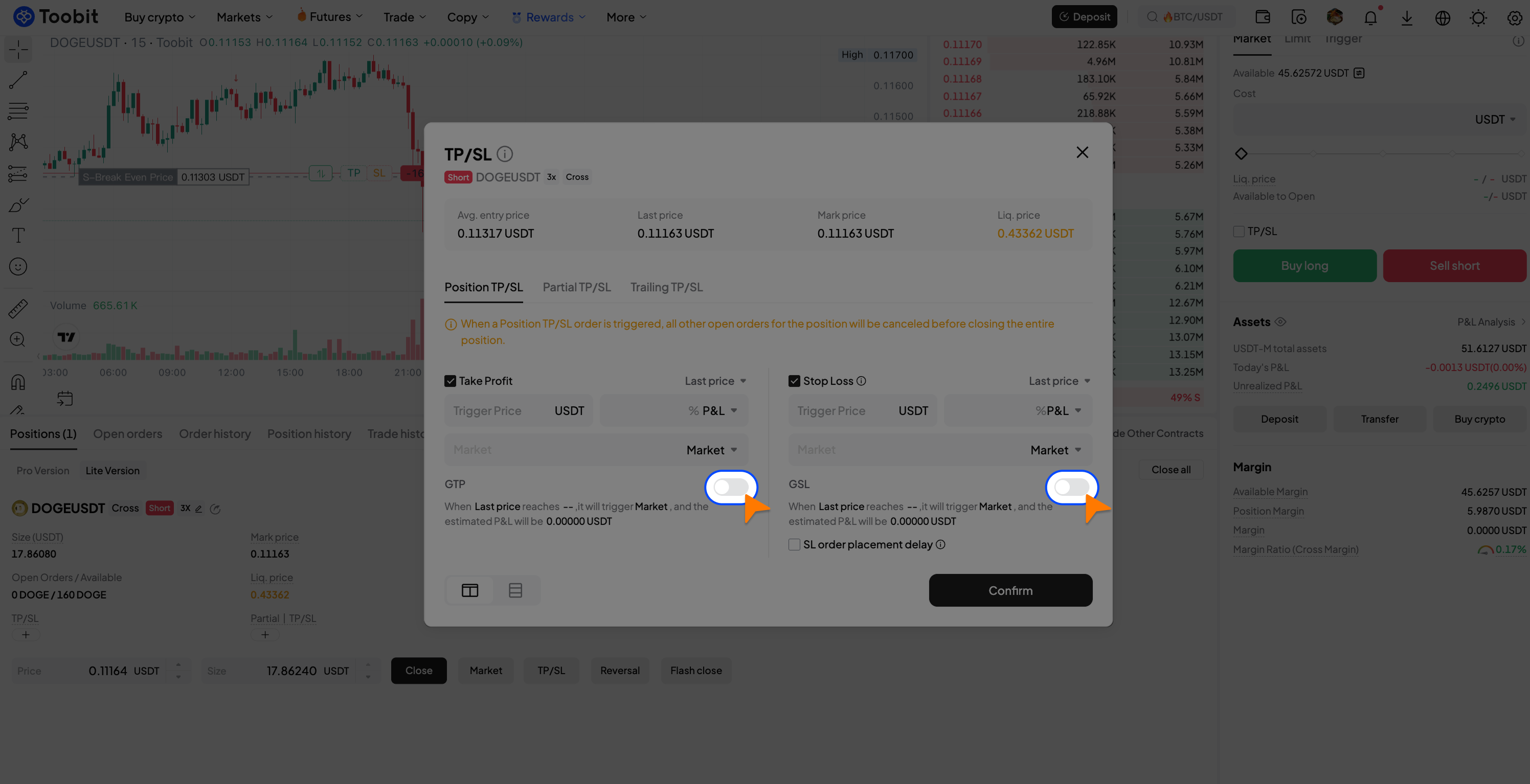
Note: You can set GTD SL either when opening a position or after the position is opened via the TP/SL panel.
4. Additional notes
1. Availability of the GTD price feature may vary depending on market conditions and liquidity. Please refer to the trading interface for supported pairs.
2. GTD price rate is dynamically adjusted based on market conditions.
3. Special case: During periods of extreme market volatility, GTD SL orders may fail to execute. If the difference between the trigger price and the market price exceeds the allowed threshold (based on the rate), the order will not be executed. For example, if the GTD price fee rate for a trading pair is 1%, and the price deviation exceeds 1%, the GTD SL order may fail to execute.
Risk Disclaimer
Trading digital assets involves significant risk, and price volatility may result in losses. While the GTD price feature helps reduce the impact of slippage, it does not guarantee profits or eliminate risk. Please trade responsibly based on your risk tolerance. All rules and rates are subject to the information displayed on the platform.


