
If your trading workflow still involves 10 tabs, 3 dashboards, and a level of patience that deserves a medal, it may be time to try Toobit’s new AI Agent Trade Kit.
The toolkit gives you a more direct way to interact with Toobit through natural language or the command line. Instead of manually checking every menu and screen, you can use it to pull market data, review balances, manage positions, and place orders with a more efficient setup.
Toobit's AI Agent Trade Kit is open-source, runs locally, and supports both MCP (Model Context Protocol) server and CLI (command-line interface) workflows.
What is Toobit AI Agent Trade Kit
Toobit's AI Agent Trade Kit is an open-source trading framework that connects AI tools to Toobit’s trading infrastructure. It enables you to trade with natural language in AI tools like Claude Code, Codex, and other MCP-compatible clients, while keeping your keys on your own device.
That means you can ask an AI client to do things like check price data, review positions, or help manage an order flow, instead of clicking through every step yourself. The kit currently includes 65 tools across MCP and CLI, covering market query, spot trading, USDT-M perpetual futures trading, and account and funds management.
How to use Toobit AI Agent Trade Kit
There are 2 main ways to use AI Agent Trade Kit.
-
MCP server
This is the conversational route. It is designed for AI-native workflows, where you interact through natural language prompts and let the toolkit translate that into supported actions and data requests.
-
CLI, or command-line interface
This route is better suited for terminal-based workflows, direct scripting, and more hands-on automation. CLI supports the full range of Toobit APIs, making it a stronger fit for structured automation setups.
What can the kit do and why does it matter
The toolkit is built around a few core functions.
-
Market data lets the AI access public information such as real-time markets, depth, and candlestick charts. This does not require authentication when you are only querying public data.
-
Trading operations include order placement, risk controls, and position management across Spot and Futures, including TP/SL support.
-
Account and asset management covers balances, open positions, fee lookups, P&L, transaction history, sub-account visibility, and security-related checks. In other words, it can help turn “what is happening in my account right now?” into a much shorter conversation.
The biggest appeal here is not just automation. It is workflow compression.
Too much of modern trading still involves repetitive manual checks. Toobit's AI Agent Trade Kit is designed to offload part of that friction by turning natural language into structured actions. That means faster lookups, quicker account checks, and a more flexible path from ideas to active trades.
Or to put less politely: your browser tabs have been getting away with too much for too long.
How to get started on Toobit's AI Agent Trade Kit
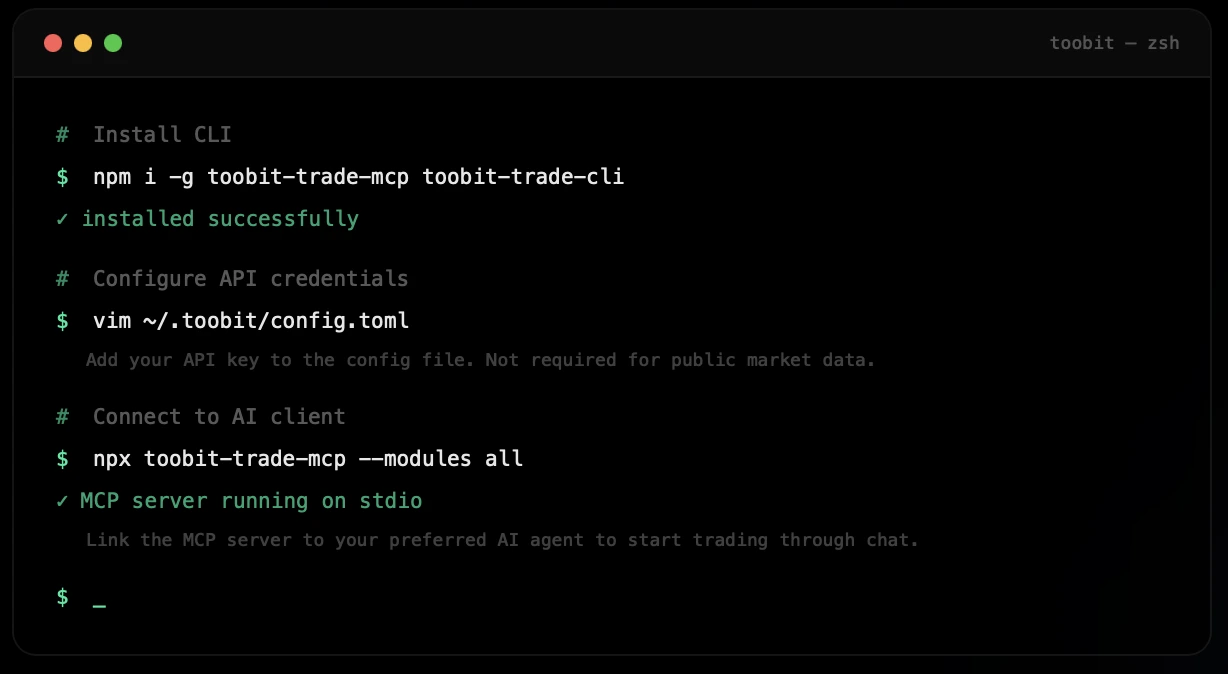
Get started with Toobit's AI Agent Trade Kit in a few simple steps. Source: Toobit
-
Pick your path: MCP or CLI
If you are going with CLI, install with this code:
npm install -g toobit-trade-cli
If you want to connect to an AI client (i.e., MCP), link the MCP server with this code:
npm install -g toobit-trade-mcp
If you cannot decide between the two, install both with this code:
npm i -g toobit-trade-mcp toobit-trade-cli
-
Create your Toobit API key
If you want the kit to do more than just query public market data, you need a Toobit API key.
API credentials should be created on the official website and added to your local configuration file. If you only want market queries, no API key is required.
-
Add your credentials to the local config file
After creating a Toobit API key on the official website, the next step is to add it to a local config file on your computer. To do that, open the file with:
vim ~/.toobit/config.toml
The API key is entered inside that file, not directly into the command line.
Once saved, the toolkit can use those locally stored credentials for authenticated actions. The key remains on your device, and public market queries do not require this setup.
-
Start the MCP server (if you picked this path)
Activate your MCP server with this startup command:
npx toobit-trade-mcp --modules all
Once it is running, the server can be connected to an MCP-compatible AI workflow, so you can start issuing commands and queries in natural language.
For more details, you may read the MCP server documentation or the CLI documentation.
How to stay safe while using AI Agent Trade Kit
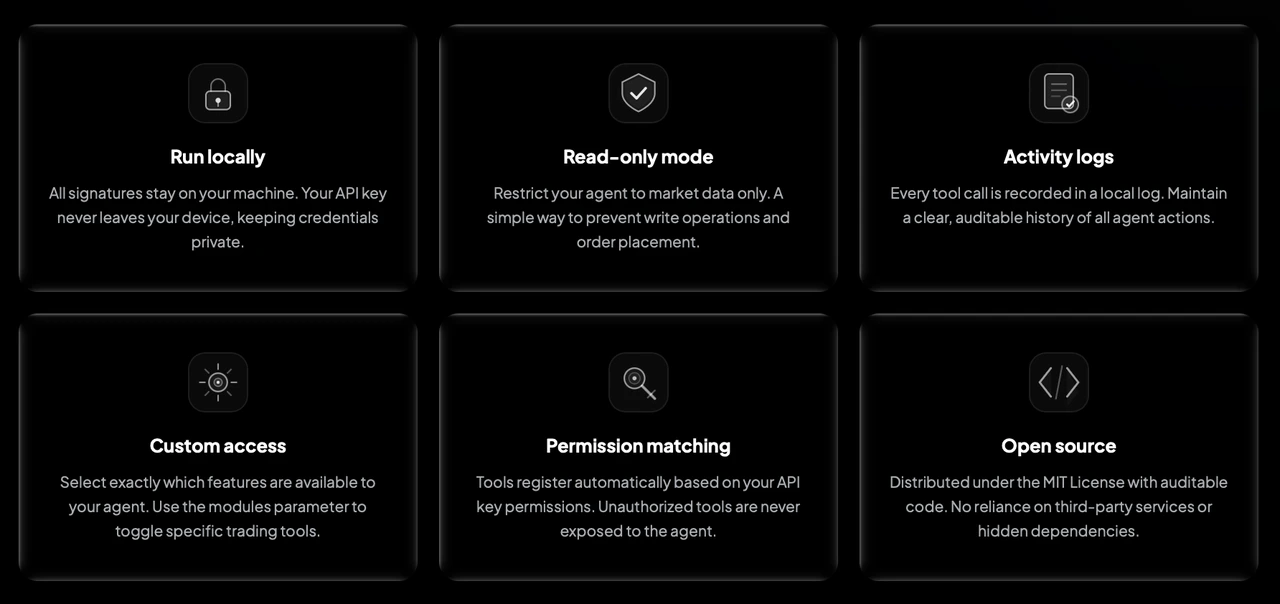
How Toobit AI Agent Trade Kit ensures that your information is safe by reducing unnecessary risks. Source: Toobit
AI Agent Trade Kit includes several built-in controls designed to reduce unnecessary risk:
-
Runs locally, so your API key stays on your machine and signing is completed locally.
-
Offers read-only mode, which limits the AI to queries without allowing it to place orders.
-
Supports module filtering, so you can control which modules are exposed instead of enabling everything at once.
-
Uses permission-based tool registration, meaning actions without API permission are not exposed.
-
Keeps local logs, so each tool call can be reviewed for traceability.
That setup gives you a cleaner way to test the system before trusting it with anything more serious.
Start simple
The safest way to begin is not by placing any orders.
Start with basic checks first:
-
Pull market data
-
Review balances
-
Inspect open positions
-
Confirm symbol info
-
Check fee or contract details
Please note that symbol formats use uppercase with no separators, such as BTCUSDT and ETHUSDT, which is worth getting right early unless you enjoy debugging avoidable mistakes.
The bottom line
Toobit's AI Agent Trade Kit is built for anyone who wants a more flexible and less cluttered way to interact with markets, balances, and workflow logic.
It gives you 2 clear paths, conversational via MCP or direct via CLI, while keeping credentials local and offering tighter controls through read-only mode, module filtering, permission-aware tool exposure, and local audit logs.
If used well, it can cut down repetitive workflow drag and make account management far more efficient.
If used without proper oversight, it is still software touching real positions.
So start small, keep permissions tight, and make sure the toolkit earns your trust before it earns more responsibility.
This article is for informational purposes only and does not constitute financial advice. Always do your own research (DYOR) before making any decisions.
How to trade on Toobit with our AI Agent Trade Kit
To get started, create a Toobit account, generate an API key, and connect our AI Agent Trade Kit through MCP server or CLI.
Once set up, you can use it to pull market data, track balances, manage positions, and place Spot or Futures trades with a more centralized workflow.
Built to run locally with controls like read-only mode and custom module access, our AI Agent Trade Kit gives you a faster way to trade on Toobit without adding more clutter to your process.


