
What is USDT-M Futures?
USDT-M Futures is contracts settled in USDT (Tether, a stablecoin pegged to the US Dollar). In this type of trading, USDT is used for settlement and margin. Futures contract is an agreement between buyers and sellers to trade a specific asset at a predetermined price and quantity at a future date, aiming to capture potential profits. Investors can go long (open a buy position) to gain from a rise in the asset price, or go short (open a sell position) to profit from a decline in the asset price.
Key features of USDT-M Futures
-
Simplified calculations: All P&L and margin calculations are conducted in USDT.
-
Perpetual contracts: No expiration date.
-
Leverage support: Offers a range of leverage options to help traders scale their positions.
-
Hedging capabilities: Support for hedging positions in the same asset.
How to trade USDT-M futures on Toobit (web)?
Step 1:Transferring
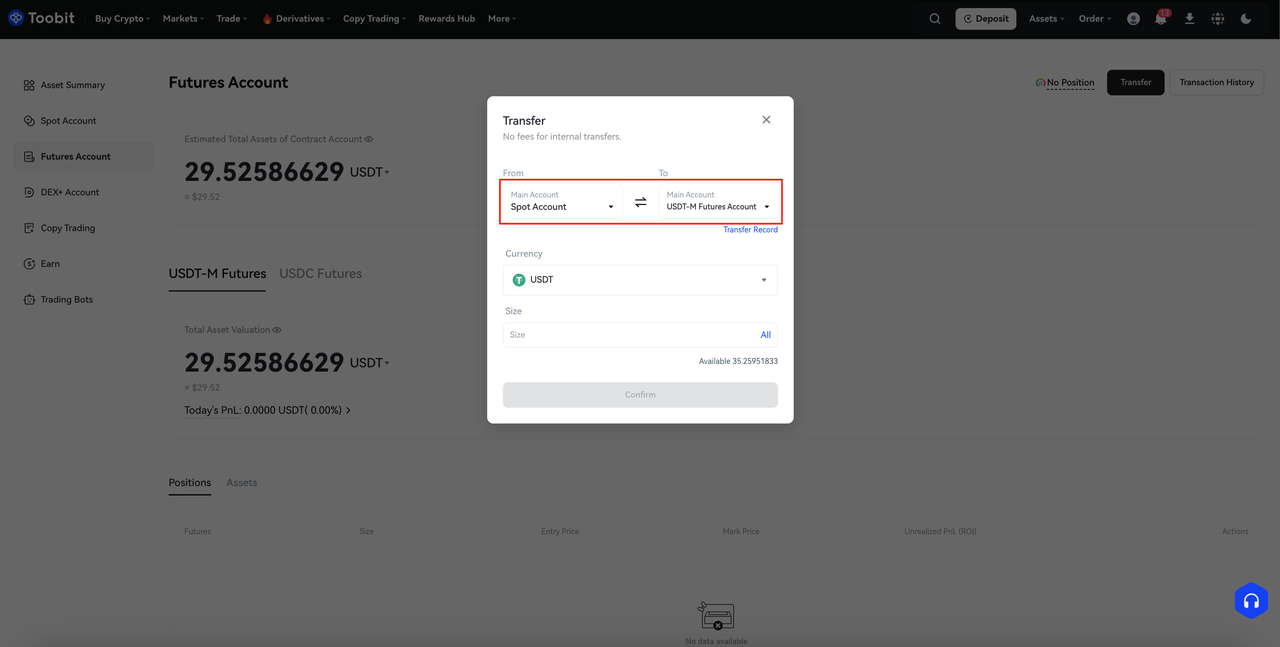
Before trading, make sure your [Futures Account] has sufficient funds (e.g., USDT).
-
Open the Toobit website and log into your account. Then click on [Assets] → [Futures Account].
-
Transfer from [Spot Account] to [USDT-M Futures Account].
-
Select the cryptocurrency, for example, USDT.
-
Enter the amount to transfer, then confirm.
Step 2: Navigate to the USDT-M Futures
-
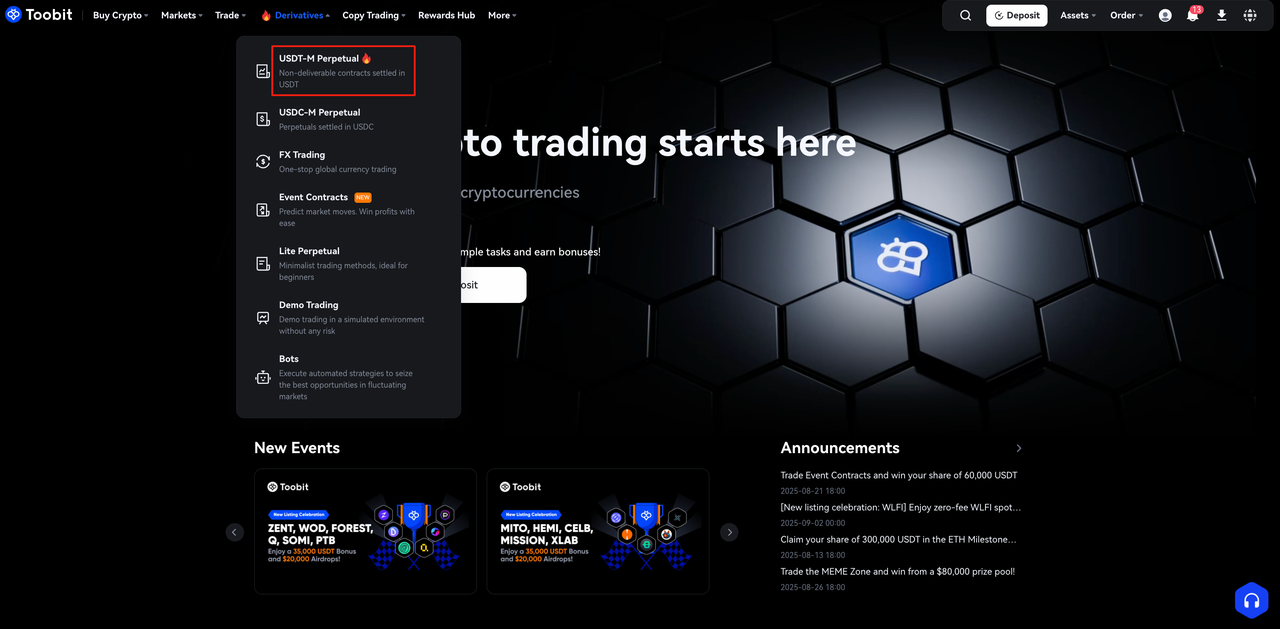
Click [Futures] in the top menu.
-
Select USDT-M Perpetual from the dropdown.
Step 3: Choose a trading pair
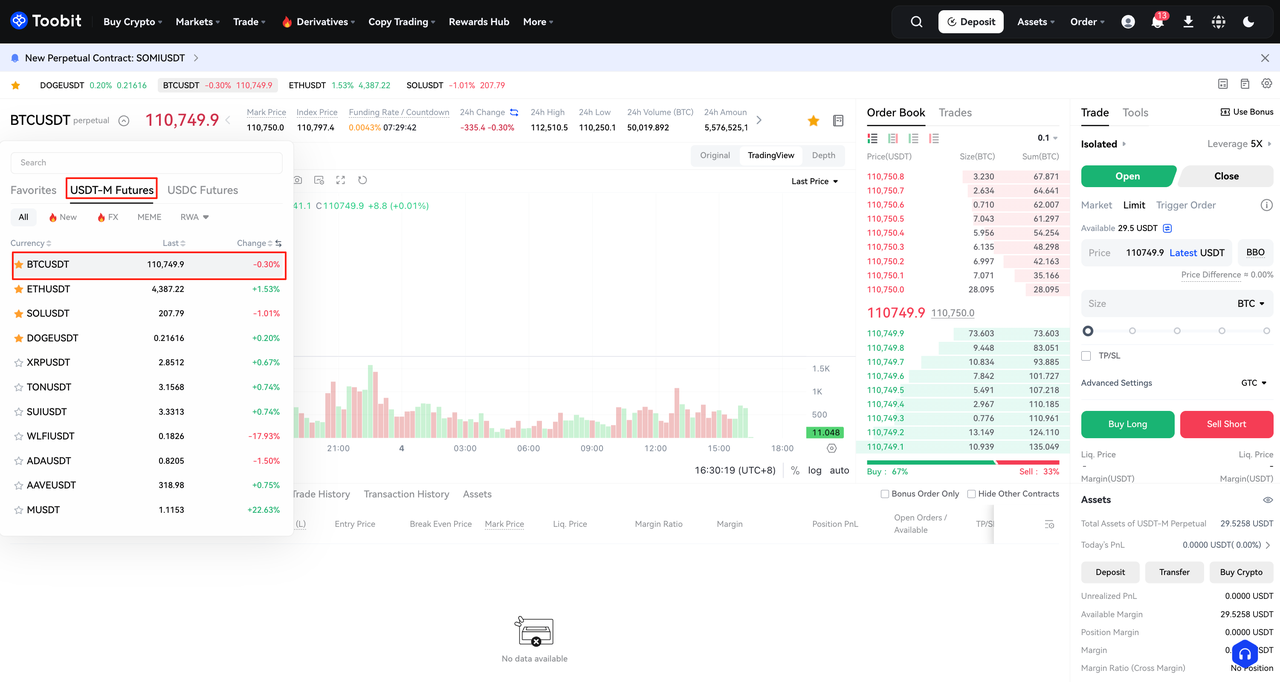
- In the USDT-M Futures section, search and select your desired trading pair (e.g., BTCUSDT, ETHUSDT).
Step 4: Configure trade Settings and Place Your Order
-
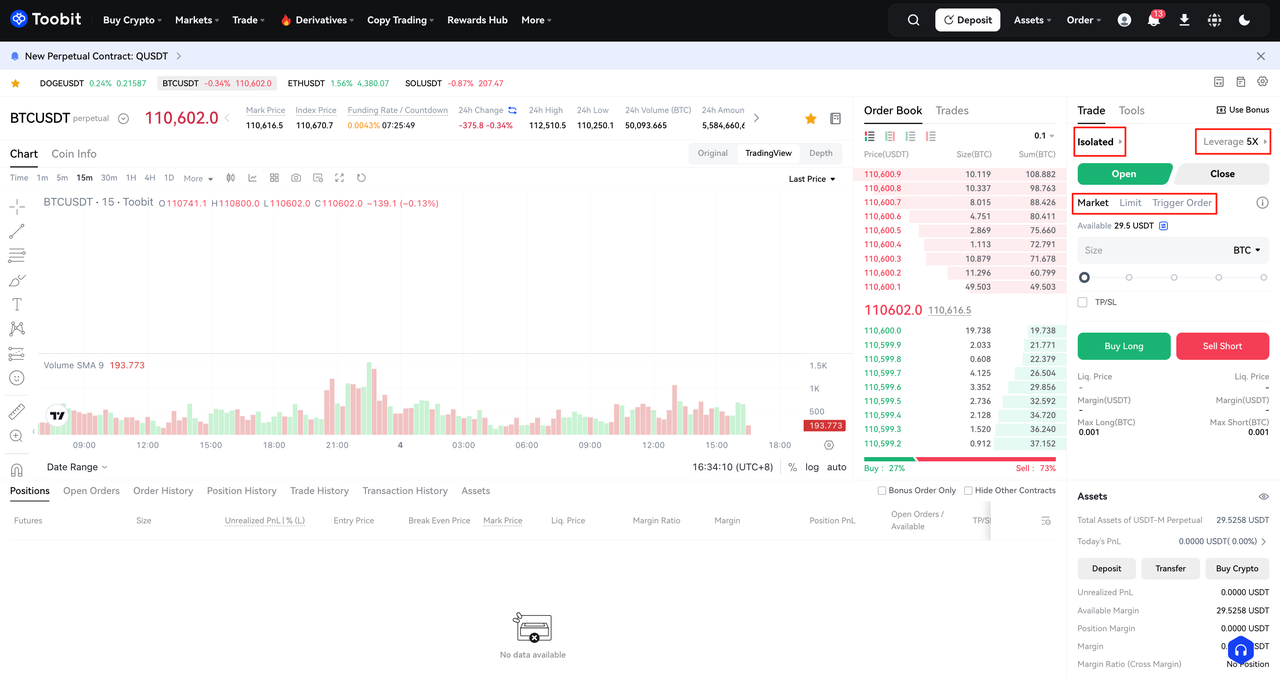
Select the Margin Mode:
-
Cross Margin: Uses your entire account balance as collateral for all positions.
-
Isolated Margin: Limits collateral to the specific position you open.
-
Click [Leverage] and adjust the Multiplier for your trade.
-
Choose [Order Type].
-
Enter the order details and select [Buy long] or [Sell short] based on your market expectations.
-
Confirm the order.
Note:
-
Isolated: Each position is calculated separately. If liquidation is triggered, assets in other Isolated or Cross Margin accounts will not be used to cover the loss. Additional margins must be added manually.
Example: In Isolated mode, if a user's Futures account has 1,000 USDT but only 200 USDT is allocated as margin to open a BTC long position, then in the event of forced liquidation, only 200 USDT will be lost, while the remaining 800 USDT stays intact.
-
Cross: All available balances of the settlement currency are shared across positions to help avoid liquidation. If account equity falls below the maintenance margin requirement, forced liquidation will occur, and all assets in that currency will be at risk.
Example: In Cross mode, if a user's Futures account has 1,000 USDT and 200 USDT is used as margin to open a BTC long position, a forced liquidation would result in the loss of the entire 1,000 USDT balance.
Step 5: Monitor and manage your position
-
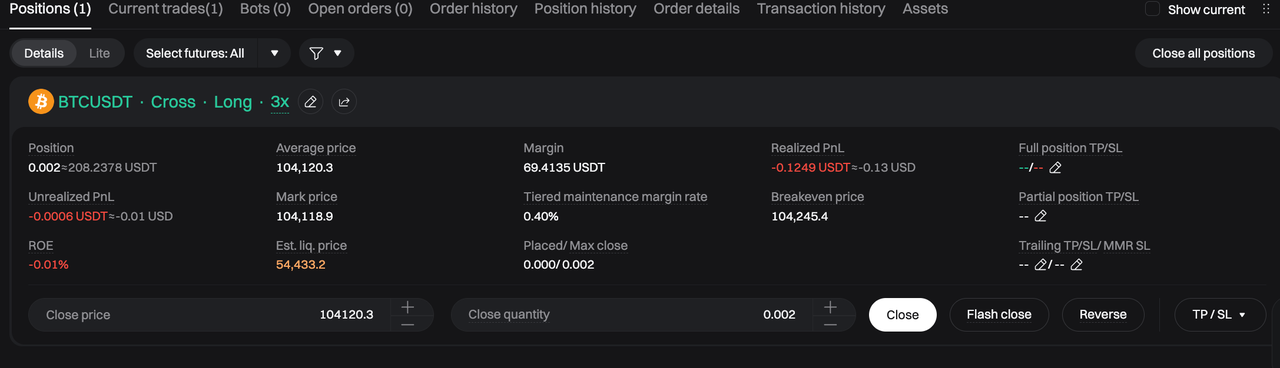
Navigate to the [Positions] tab in the trading interface to view open trades.
-
Use the "Market, Limit, Reversal, Flash close" button to exit positions.
How to trade USDT-M Futures on Toobit (app)?
Step 1: Navigate to the USDT-M Futures
-
Tap [Futures] on the bottom menu bar.
-
Select USDT-M to access the trading interface.
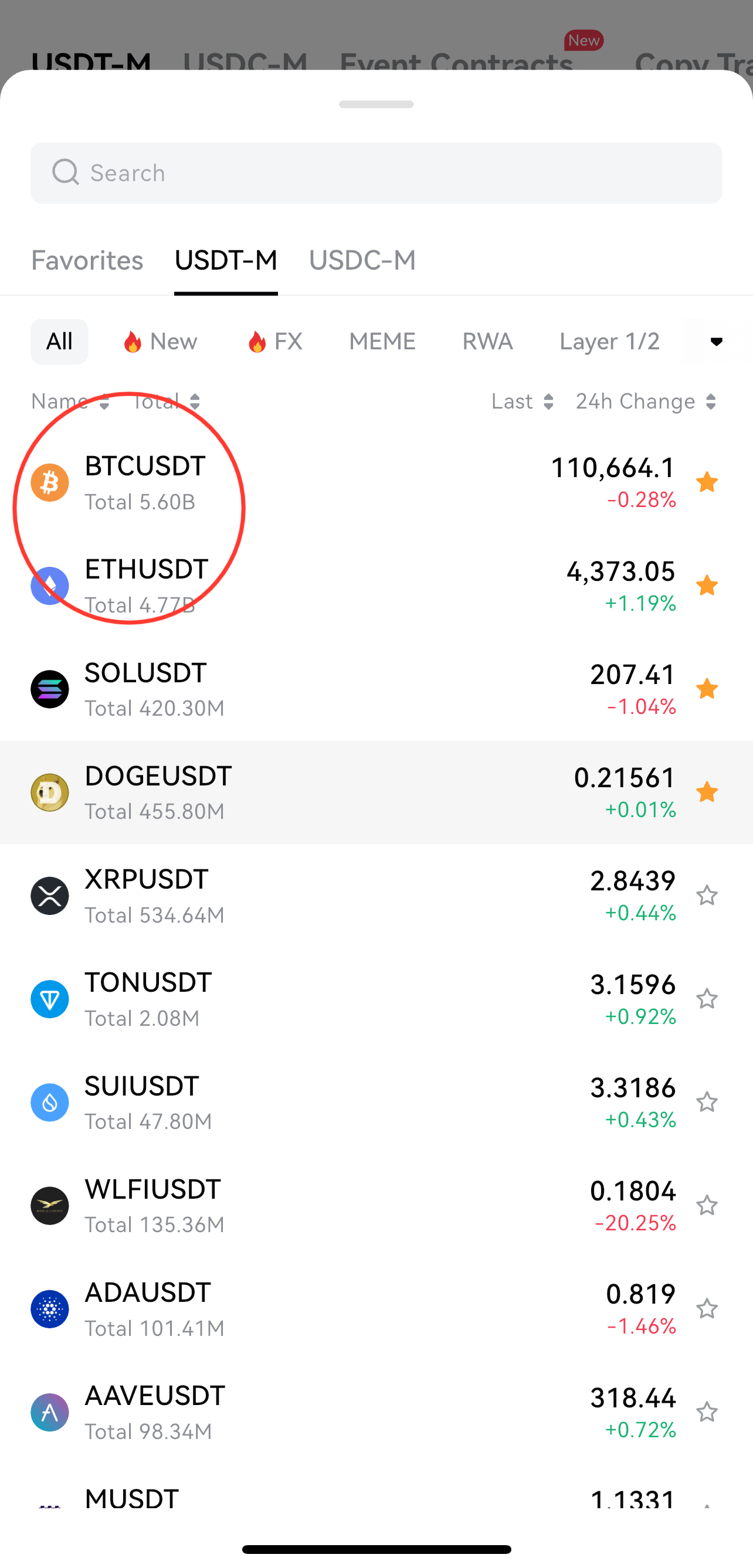
Step 2: Choose a trading pair
-
In the USDT-M Futures trading interface, search for and select your preferred trading pair (e.g., BTCUSDT, ETHUSDT).
Step 3: Set up your trade and place an order
-
Select the Margin Mode:
-
Cross Margin: Uses your entire account balance as collateral for all positions.
-
Isolated Margin: Limits collateral to the specific position you open.
-
Click [Leverage] and adjust the Multiplier for your trade.
-
Choose [Order Type].
-
Enter the order details and select [Buy long] or [Sell short] based on your market expectations.
-
Confirm the order.
Step 4: Monitor and manage your position
-
Go to the Positions tab to track open trades.
-
Use Close Position to exit a trade when desired.
Key reminders for USDT-M Futures trading
-
Leverage management: Higher leverage may amplify potential profits but also magnify risks. Trade responsibly and understand the implications before adjusting leverage.
-
Set TP/SL orders: Define Take-Profit and Stop-Loss levels in advance to automate position exits once the preset thresholds are reached.
-
Monitor liquidation risk: Regularly check your margin ratio to reduce the risk of forced liquidation caused by insufficient collateral.
-
Follow market trends: Stay updated on market movements and adjust your trading strategy promptly to keep pace with changing conditions.
FAQs
-
What is the minimum amount required for USDT-M futures trading? The minimum amount varies by trading pair and its margin requirements. Please check the trading interface for the exact amount.
-
How does margin work in USDT-M futures? Margin refers to the USDT collateral required to open and maintain your positions. You can choose between Cross Margin and Isolated Margin modes depending on your trading strategy.
-
What happens if my margin ratio falls too low? If your margin ratio falls below the maintenance level, your position will be automatically liquidated to prevent further losses.
-
Can I trade USDT-M futures on both the app and website? Yes. USDT-M futures trading is available on both the Toobit app and website, with the same core features supported across platforms.
-
Can I adjust leverage after opening a position? Yes. Leverage can be adjusted to open positions. Please note that changing leverage will affect your margin requirements and overall risk exposure.
-
How can I manage liquidation risk? To reduce liquidation risk, always maintain a healthy margin ratio. Monitor your positions closely and consider using stop-loss orders for better risk management.
-
How can I view my current positions and profit/loss? You can check all active positions and their real-time profit and loss in the [Positions] section of the trading interface.
Disclaimer
All trading tutorials provided by Toobit are intended for educational purposes only and do not constitute financial advice. The strategies and examples shown may not reflect actual market conditions. Users should practice caution when trading and make decisions based on their own judgment and experience. If you'd like to exchange trading insights with other users, feel free to join our official Telegram group or follow us on Twitter.
Happy Trading,
Toobit Team


